


ElkNut
4.3142.00 Reviews
App Specs
- Version
- 4.0.8
- Updated On
- License
- Free
- Downloads
- 10,000+
- Developer
- Got Game Technologies
- Categories
- Sports
- Platform
- Android
Screenshots
 Analysis by AppCompare
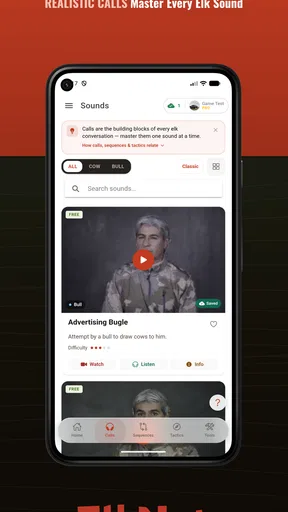
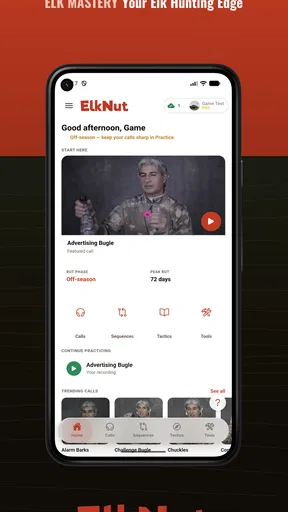
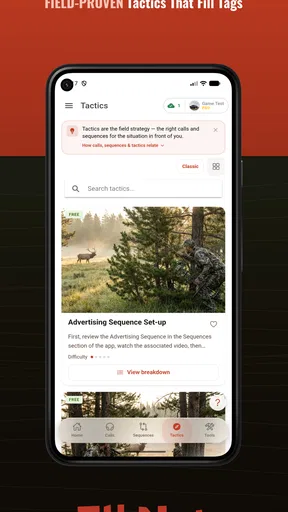
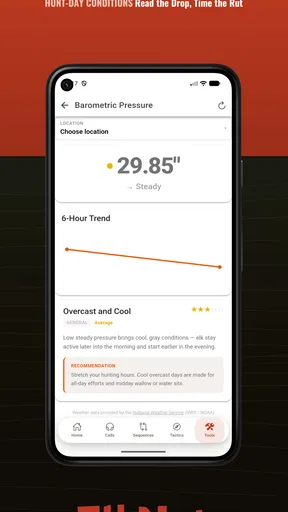
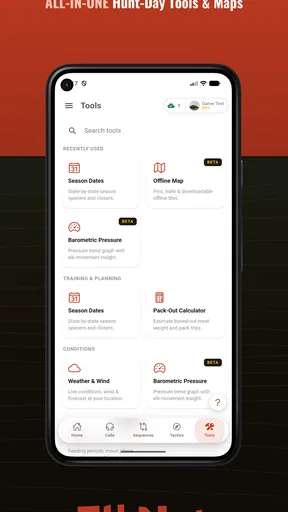
I found ElkNut most useful when I treated it as a practical companion for elk hunting rather than as a complete replacement for field experience. It brings calls, sequences, tactics, hunt tools, AI call coaching, and offline access into one sports app, which makes it more focused than a general hunting reference. I could open it with a specific question in mind—how to structure a calling sequence, how to practice a sound, or what to check before leaving service—and get to the relevant material without carrying several separate references.
That focus is also the reason I would not recommend it blindly to every hunter. Someone looking for broad wildlife identification, mapping, weather, or a full trip-planning platform may find its scope narrow. Someone who specifically wants to improve elk calling and keep useful material available away from a signal has a much clearer reason to try it. The app is free to install, rated for Everyone, and developed by Got Game Technologies, so the initial barrier is low. Optional purchases are listed at $14.99 per item, which is worth remembering before treating the free download as the complete experience.
What ElkNut is really useful for in the field
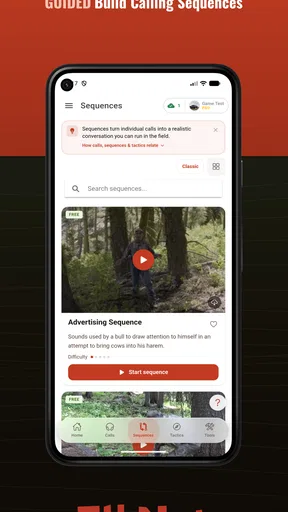
The strongest part of the app is its concentration on elk calling. Rather than presenting hunting as a collection of disconnected tips, it appears designed around the relationship between sounds, timing, tactics, and sequences. That matters because a single call rarely makes sense in isolation. The useful question is usually what to do before it, what response to watch for, and when to stop calling. An app organized around sequences can help a newer hunter think in that order.
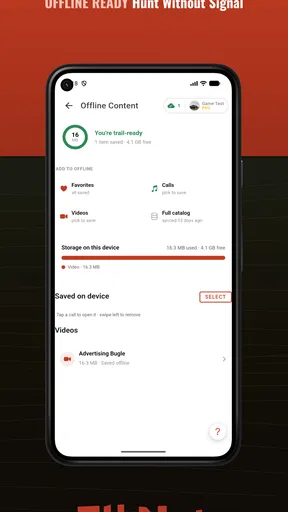
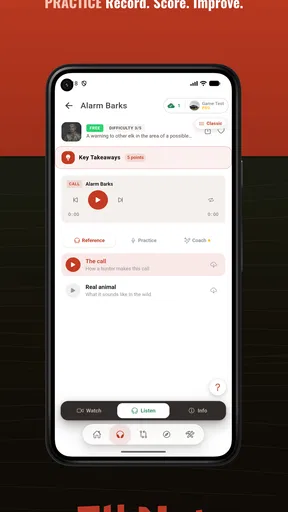
I especially like the idea of using it in two different places: at home for deliberate practice and outdoors as a quick reminder. Those are not the same job. At home, I can spend time listening, comparing, and repeating a call without the pressure of a real encounter. In the field, I need short, accessible guidance that does not force me to reconstruct a whole lesson while moving through unfamiliar terrain. The inclusion of offline mode is important here because a hunting area may not offer reliable service, and a tool that only works beside a road is much less valuable.
The app also has a sensible role for hunters who already know the basics but want a more repeatable routine. Experience can make people confident, but confidence does not always produce consistency. A sequence guide can act as a checklist before a hunt: decide the situation, choose a calling approach, keep the timing measured, and observe rather than filling every quiet moment with sound. That structure is more useful to me than a long collection of isolated tricks.
AI coaching is most valuable as a practice aid
The AI call coaching is the feature I would test first, but I would keep my expectations realistic. Coaching can help identify weaknesses in practice and encourage a more disciplined way to work on calls. It may be particularly helpful for someone who cannot regularly practice with an experienced caller. Instead of relying only on memory or self-confidence, the user gets an additional point of feedback while building a routine.
At the same time, I would not let automated coaching become the final authority in a real hunt. Elk behavior depends on context, terrain, wind, distance, pressure, timing, and the animal’s response. A technically recognizable sound does not guarantee that the situation calls for it. My preferred workflow would be to use the coaching feature away from the hunt, then use the app’s tactical material to connect sound practice with decisions in the field.
Worth Reading Before You Choose

Flipboard Shows What News Apps Must Do Beyond the Feed

Switching to Android Auto Means Rethinking Your Driving Routine

Google Calendar Makes a Crowded Week Easier to Manage

Ludo King Makes the Most of the Minutes Between Plans

Baby Panda World Brings Quick Play to Modern Phones, but Its Game Library Feels Busy

ESPN’s Live Game View Makes Following Close Games Easier
A useful, less obvious approach is to practice one call at a time and record what the coaching suggests before moving to a full sequence. That prevents the common mistake of hiding an uncertain sound inside a complicated routine. Once the individual call feels dependable, I would work through a sequence and pay attention to the pauses. The pause is part of the tactic; an app can remind me of that, but it cannot replace watching the surroundings and judging whether the situation has changed.
Offline access changes how I would prepare
Offline mode should be treated as a preparation feature, not something to discover after arriving in the mountains. Before leaving, I would open the sections I expect to use and make sure the relevant material is available without a connection. I would also avoid assuming that every part of an app behaves identically offline. If a feature depends on active processing or connectivity, it may be more practical to use it at home and rely on saved field material outdoors.
This creates a simple two-stage routine. The first stage is connected preparation: review calls, use the coaching tools, and decide which sequences fit the planned situation. The second stage is offline reference: keep the chosen guidance available for a quiet check when service disappears. That division makes the app less distracting and reduces the temptation to stand in the field trying to browse everything at once.
There is a trade-off here. Offline reference is excellent for resilience, but it also puts responsibility on me to prepare properly. A physical notebook or downloaded document can be easier to understand at a glance, while an app offers richer organization and interactive practice. I would use ElkNut for the latter and keep my field routine simple enough that I am not dependent on constant screen time.
Trust, controls, and responsible use
I approach trust and controls as part of getting ready, not as paperwork to rush through. I would check permissions and purchase settings before relying on any coaching or hunt tool, then decide which features genuinely belong in my routine. That keeps the phone’s role intentional and sets up a closer look at how I can use its guidance responsibly in the field.
What I can judge from the visible product choices
Trust in a hunting app is not only about whether the advice sounds convincing. It is also about whether the product gives me understandable choices and lets me decide how much of it to use. ElkNut’s visible positioning is clear: it is a sports app centered on elk calls, tactics, sequences, coaching, hunt tools, and offline use. That clarity helps because I can evaluate it against a specific need instead of assuming it is a general-purpose hunting system.
The public reception is encouraging without being a reason to stop thinking critically. The app shows a 4.3 average from around 226 ratings, with around 142 written reviews, and it has passed 10K+ installs. I read those figures as evidence of a real user base and reasonable interest, not as proof that every hunter will find the advice suitable. A smaller, focused audience can still contain very different experience levels, hunting styles, and expectations.
The app’s age rating of Everyone is reassuring from an access perspective, but it should not be confused with a guarantee that every recommendation fits every hunting situation. The subject itself requires judgment and responsibility. I would still follow local regulations, land rules, seasonal requirements, and safe firearm or archery practices rather than treating an in-app suggestion as permission.
Data-sensitive moments deserve attention
Any app with coaching or hunt tools can create moments where I should pause and check what I am choosing to share or enable. I would look carefully at the app’s permission prompts, especially when a feature asks for access that is not obviously needed for the immediate task. I would also review the privacy information available through the app store and device settings, then decide whether the convenience of a particular tool justifies the information involved.
I am more comfortable using an offline reference after preparing it than leaving every feature active throughout a hunt. That is not an accusation about the developer; it is simply a sensible way to reduce unnecessary exposure and battery use. The same principle applies to location-sensitive material: I would only grant access when I understand why it is needed, and I would revisit the choice later rather than leaving permissions untouched forever.
Account controls matter in the same practical way. If the app offers sign-in, purchases, or synchronization, I would use an account only when the benefit is clear. I would also check the device’s purchase authentication settings before exploring optional content, particularly because individual in-app items are listed at $14.99. That small preparation avoids accidental purchases and keeps the free starting point under my control.
Where it fits beside ordinary alternatives
The usual alternative is a mixture of printed calling guides, videos, personal notes, and advice from an experienced hunting partner. Those options still have advantages. A trusted mentor can explain why a call is appropriate in a particular setting, while a printed guide never runs out of battery. Video can also show timing and body language in a way that a compact app may not fully capture.
ElkNut’s advantage is integration. Calls, sequences, tactics, coaching, and field tools are brought together instead of being scattered across unrelated sources. That makes it easier to build a repeatable practice plan and carry a focused reference. Its weakness is that convenience can encourage overreliance. A digital sequence may feel authoritative even when the real answer is to stay quiet, change position, or wait.
It is also not the obvious choice for someone whose main need is navigation or trip logistics. If my priority were detailed mapping, route recording, weather monitoring, or a broad species library, I would choose a dedicated tool for that job and treat this app as a specialist add-on. Its value comes from depth around elk calling, not from trying to cover every outdoor task.
A realistic day-to-day workflow
Imagine I am preparing for an early hunt in an area where service is unreliable. The night before, I use the connected part of the app to review the calls I am least confident about, run through coaching, and revisit the sequence that matches my planned approach. I then open the hunt tools and offline material I expect to need. I do not try to memorize every page; I narrow the preparation to a few decisions.
In the morning, I keep the phone accessible but out of constant use. If I reach a planned calling position, I can consult the offline guidance briefly, put the device away, and focus on wind, terrain, movement, and responses. If nothing happens, I avoid treating the app as a button that must be pressed repeatedly. The sequence is a framework, not a command. That distinction is one of the most important ways to use the product responsibly.
After the outing, I would note what actually happened and compare it with the plan. Did I call too often? Did I rush the pauses? Did the conditions make the selected tactic unsuitable? This turns the app into a learning loop rather than a one-time reference. The coaching feature supports sound practice, while the field experience supplies the judgment that no automated lesson can fully provide.
Who should install it, and who should skip it
I would recommend trying it to a beginner who wants a structured introduction to elk calling, especially if practicing alone feels directionless. It can also suit an intermediate hunter who has accumulated scattered notes and wants calls, sequences, and tactics in one place. The free entry point makes it reasonable to explore before deciding whether optional content is worth the cost.
I would be more cautious with an expert who already has a reliable system, a mentor network, and printed references that work well offline. That hunter may gain convenience but not enough new value to justify changing established habits. I would also suggest skipping it if the main goal is mapping, weather, navigation, or a comprehensive hunting database. The app’s specialist focus is a strength only when that focus matches the user’s actual problem.
Another group should approach it carefully: users who want a fully automatic answer to animal behavior. ElkNut can organize practice and offer guidance, but it cannot remove uncertainty from hunting. If I am unwilling to adapt when the wind shifts, visibility changes, or an animal responds unexpectedly, no calling app will solve the deeper issue. The best results come from using its material to improve preparation while keeping decisions grounded in observation and lawful, safe conduct.
Performance, cost, and the current package
The current version is 4.0.8, and it supports devices running Android 7.0 or later. That makes it accessible to people who do not replace their phones frequently, although practical comfort will still depend on the device, screen readability, battery condition, and how much preparation is done before leaving home. For a remote hunt, I would carry a power bank regardless of which app I use.
The free price is a meaningful advantage because it lets me judge the organization and basic usefulness before spending anything. The optional purchases at $14.99 per item mean I would check exactly what each item adds and whether it addresses a real gap in my routine. I would not buy simply because a feature sounds advanced. The right question is whether it improves practice, field access, or decision-making enough to earn a place in my kit.
My main friction is the risk of turning a focused field aid into another screen-based distraction. Elk hunting rewards patience, awareness, and quiet observation, while an app naturally invites browsing. I would solve that by preparing at home, using offline material selectively, and setting a personal rule that the phone supports the hunt rather than becoming the hunt.
After using it as a focused reference, I see ElkNut as a sensible companion for hunters who want help with elk calls and repeatable sequences. Its strongest qualities are its narrow purpose, AI-assisted practice, tactical organization, and offline usefulness. Its limitations are equally clear: it cannot replace judgment, mentorship, local knowledge, or specialized navigation tools, and optional purchases deserve a deliberate look.
My cautious verdict is that ElkNut is worth trying when elk calling is the specific skill I want to improve. I would install it, test the free experience, prepare offline material before heading out, and inspect permissions and purchase controls rather than accepting every prompt automatically. Used that way, it can make practice more organized and field preparation more dependable. I would keep it as one tool in a broader hunting system—not as the authority that decides what the woods are telling me.
Pros
- Simple interface makes ElkNut easy to navigate for new users.
- Useful tracking tools help users monitor relevant activity over time.
- Lightweight design should run smoothly on many modern devices.
- Clear organization makes important information quick to find.
- Convenient mobile access keeps key features available while traveling.
Cons
- Some features may require an account or personal information to use.
- Performance can vary depending on device age and internet connection.
- The app may feel limited for users seeking advanced customization.
- Notifications could become distracting if enabled too frequently.
- Availability of certain features may differ between Android and iOS.
FAQs for ElkNut
What is ElkNut, and what can I use it for?
ElkNut is an app designed to provide information and tools related to elk hunting and outdoor activities. Depending on the version and region, it may help users explore hunting resources, organize plans, review useful field information, or connect with relevant content. Before downloading, check the current store description because available features can vary between Android and iOS and may change with updates.
Is ElkNut free to download and use?
ElkNut may be available as a free download, but some features or content could require in-app purchases, a subscription, or an account. I recommend reviewing the pricing section in the Google Play Store or Apple App Store before installing it. Also check whether optional purchases unlock additional tools, remove advertising, or provide access to premium hunting information and services.
Does ElkNut require an internet connection?
An internet connection may be necessary for downloading content, signing in, synchronizing information, receiving updates, or accessing location-based and online features. Some parts of the app may work offline, but offline availability should not be assumed unless it is clearly stated by the developer. If you plan to use ElkNut in remote hunting areas, test the required features before leaving cellular coverage.
Does ElkNut use my location or personal information?
ElkNut may request access to location services if it includes mapping, navigation, nearby information, or other outdoor tools. It may also collect account details, device data, usage information, or information you submit voluntarily. Before creating an account, review the app’s privacy policy and permission requests. Only enable access that is necessary for the features you intend to use.
Is ElkNut suitable for beginners, and what should I check before using it outdoors?
ElkNut can be useful for both newcomers and experienced outdoor users, but it should be treated as a supporting tool rather than a replacement for official regulations, maps, safety equipment, or local knowledge. Before relying on it, confirm that its information is current for your area, verify hunting rules with official authorities, charge your device, and prepare a backup plan in case the app, GPS, or network connection fails.


